Menu
APP SUPPORT GUIDE

Can E-Ink tablets run apps?

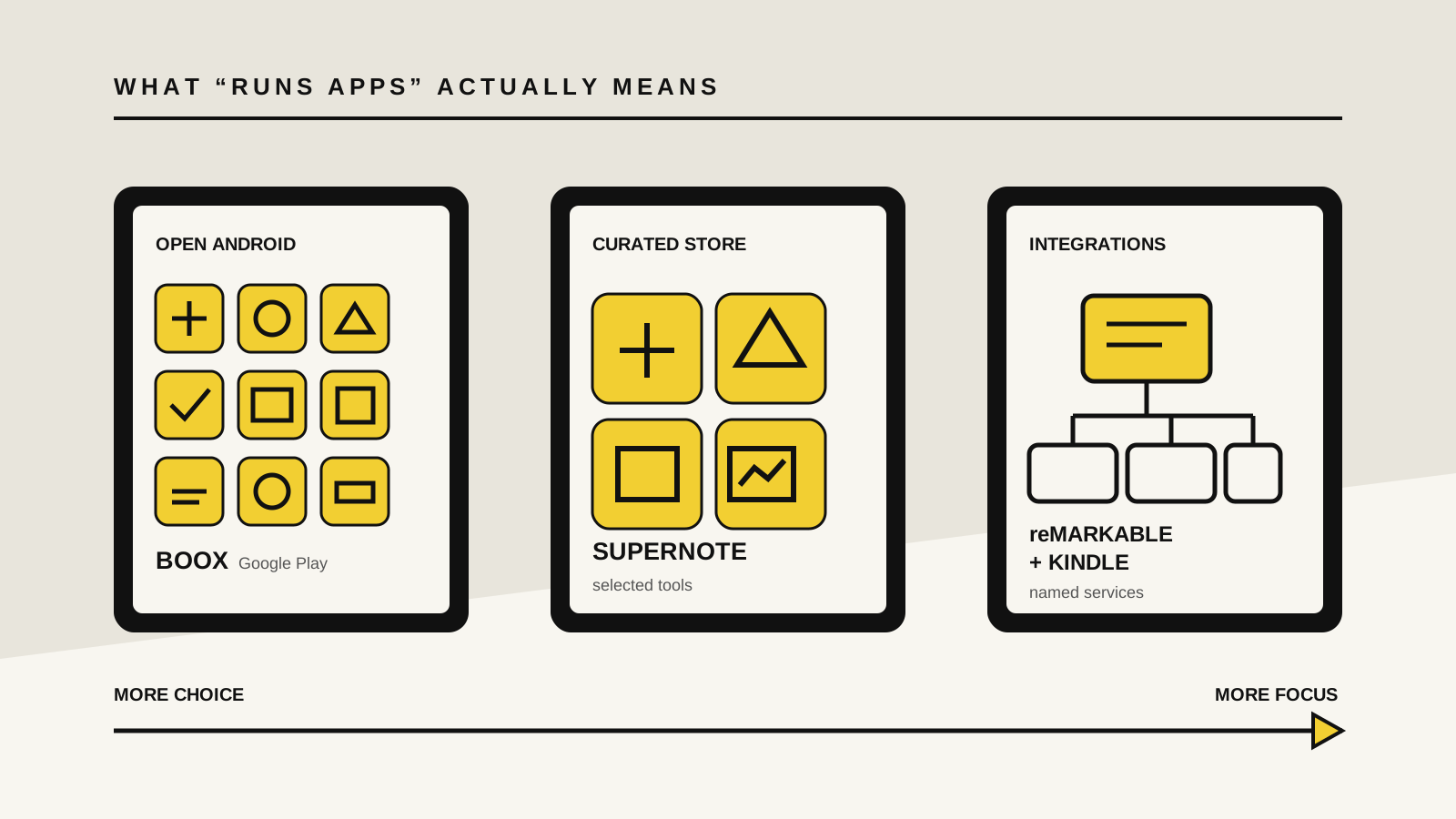
Some can. BOOX tablets provide broad Android app access, Supernote offers a small curated store, and reMarkable and Kindle Scribe use selected integrations instead of a general app platform. The harder question is whether the app still feels useful on E-Ink.

By Yeinks8 min read
Comparison diagram showing open, curated and integrated approaches to apps on E-Ink tablets
“Runs apps” can mean full Google Play access, a small approved store or a handful of built-in connections. Illustration: Yeinks.

THE SHORT ANSWER

Yes, but app support ranges from open Android to a carefully fenced garden.

Choose BOOX if installing ordinary Android apps is essential. Choose Supernote if a small, device-focused catalog is enough. Choose reMarkable or Kindle Scribe only when their built-in tools and named integrations already cover your workflow.

An app appearing in a store is not the same as that app being pleasant on E-Ink. Fast scrolling, animation, video, dark themes and tiny controls can expose the display's slower refresh and limited color. App access should narrow your shortlist, not finish it.

HOW THIS GUIDE WAS MADE

This compares documented support, not every app in every region.

Yeinks checked current manufacturer product pages, help guides and software notes on October 19, 2026. We did not install and test the same app on every device, so this is not a performance ranking. Store catalogs, Android versions, account rules and regional availability can change. Confirm your exact app on the exact model before buying.

AT A GLANCE

Four platforms, three meanings of app support

PlatformApproachWhat you can install or connectBest forMain catch
BOOX tabletsBroadGoogle Play Store and third-party Android appsReading, cloud, research and office appsApps may need per-app refresh and contrast tuning
Supernote Manta and NomadCuratedSupernote App Store with selected appsFocused writing, drawing, Kindle reading and file toolsNo promise that any Android app you want will be available
reMarkable paper tabletsIntegratedNo general on-device app store; selected cloud and workflow connectionsNotes, PDFs, reading, cloud import and exportYou use supported integrations, not full third-party apps
Kindle Scribe familyIntegratedNo general on-device app store; Kindle and selected connectionsKindle books, notebooks and supported cloud document workNot a replacement for an Android or iPad app library

A model may use a newer or older Android release than another device from the same brand. Google Play access, app compatibility and individual features can also vary by model and region.

THE TEST THAT MATTERS

Ask what the app does on E-Ink, not only whether it opens.

A reading app that turns pages and displays mostly static text is a natural fit. A task manager, calendar or document editor can also work well if its controls are clear and it does not depend on constant motion.

Video, games, live maps and animation-heavy interfaces are poor matches. Even useful apps may need a faster refresh mode, stronger contrast or a lighter theme. Those changes can reduce ghosting or improve motion, but faster refresh may look rougher and use more power.

HOW EACH PLATFORM WORKS

Open Android, curated apps and focused integrations

01

BOOX: the closest thing to a normal Android tablet

Current BOOX tablets such as the Note Air6 C ship with Android and the Google Play Store. That gives you the broadest official route to third-party reading, cloud storage, research, note-taking and office apps. BOOX also provides per-app display controls through its E-Ink software, because one refresh setting rarely suits both a book and a scrolling inbox.

This freedom is the reason to buy BOOX, but it is also the complication. An app can be technically compatible while its animations flicker, its colors merge into gray or its handwriting support feels slower than BOOX's native Notes app. If one app is essential, check recent compatibility information and test its core task during the return period.

02

Supernote: a small store built around the notebook

Supernote Manta and Nomad have a Supernote App Store, but it is not Google Play. Supernote's current documentation names a focused set of tools including Kindle, Atelier, InkFlow and file or server utilities. The native platform also handles notes, documents, calendar, mail, to-do lists and cloud workflows.

That makes Supernote a middle path. You get more than a sealed notebook, without the maintenance and distraction of a full Android catalog. The cost is obvious: if your workflow depends on a particular third-party Android app, do not assume it will appear in Supernote's store just because the device itself is based on Android.

03

reMarkable: integrations instead of an app library

reMarkable's current paper-tablet workflow is built around its own notebook, reading and file tools. It supports named integrations with Google Drive, Dropbox and OneDrive, allowing you to browse compatible files, import them and export notes. Connect adds further web, conversion and sharing features.

That is not the same as installing the Google Drive app, Slack, Notion or a general Android browser on the tablet. Some services appear as specific reMarkable features, such as supported cloud storage or sending work into another tool. Buy it when those defined routes are enough and the absence of a full app store is part of the appeal.

04

Kindle Scribe: Kindle first, with selected document connections

Kindle Scribe is centered on Kindle books, personal documents and notebooks rather than third-party tablet apps. Amazon's current support material documents direct Google Drive and OneDrive access, plus notebook export to OneNote, on Scribe models released in 2025 or later. Those are service connections, not installable versions of the Android apps.

If your job is reading from Kindle and marking up supported documents, that focus can be useful. If you expect to add Kobo, Libby, Obsidian or a favorite task manager to the device, Kindle Scribe is the wrong starting point. BOOX is the clearer choice for a multi-store or multi-app library.

PICK BY THE JOB

Match the platform to the app you actually need

Your requirementBest starting pointWhy
Install Kindle, Kobo, Libby, OneNote or another Android appBOOXGoogle Play provides the widest official route, subject to app and regional availability.
Use a small set of tools without building a tablet full of distractionsSupernoteIts store is deliberately curated around the device and its writing workflow.
Write and annotate with direct Google Drive, Dropbox or OneDrive accessreMarkableThe supported integrations handle files without turning the paper tablet into a general app device.
Read Kindle books and move documents through Amazon or supported cloud connectionsKindle ScribeThe Kindle ecosystem is the point; general third-party apps are not.
Watch video, edit complex slides or depend on fast animated interfacesUse an LCD or OLED tabletE-Ink refresh behavior remains the bigger limit even when an app installs.

CHECK BEFORE YOU BUY

Run a five-minute app audit

  1. Name the app, not the category. “Cloud storage” is vague. “The current OneDrive Android app with offline folders” is testable.
  2. Write down the one action you need. Reading a shared PDF is different from editing a live spreadsheet or joining a video call.
  3. Confirm the official access route. Look for Google Play, the manufacturer's curated store or a specifically documented integration.
  4. Check E-Ink behavior. Search for current information about scrolling, pen latency, refresh modes, dark themes and login support on your exact model.
  5. Plan for failure. Make sure files can still be exported or opened elsewhere if an app update stops working.

If app access is only one part of your decision, compare the best E-Ink tablets for note-taking and reading. Our E-Ink tablet vs iPad guide explains when a conventional tablet is the better tool. For reading services and book formats, see which E-Ink tablets can read ebooks.

BOTTOM LINE

Buy BOOX for apps. Buy the others for their boundaries.

BOOX is the straightforward answer when Google Play access is a requirement. Supernote is better when you want a notebook with a small, purposeful catalog. reMarkable and Kindle Scribe make sense when their named integrations already cover the work and you value a narrower device.

Do not pay for theoretical compatibility. One reliable reading, writing or cloud workflow is more valuable than a home screen full of apps that were designed for a faster display.

Primary sources checked

Checked October 19, 2026. App stores, software versions, service connections and regional availability can change. Confirm the exact model and app before buying.

BOOXNote Air6 C Android version, built-in Google Play Store and third-party ecosystem support ↗BOOXCurrent tablet guide sections for installing, optimizing and managing apps ↗SupernoteSupernote App Store access and examples from the current curated catalog ↗SupernoteManta and Nomad app, Kindle and software support notes ↗reMarkableGoogle Drive, Dropbox and OneDrive integration scope and file workflows ↗reMarkableCurrent paper-tablet, web app and connected workflow features ↗AmazonKindle Scribe connections to Google Drive, OneDrive and OneNote ↗AmazonCurrent Kindle Scribe user guides and supported setup resources ↗