Menu
PRACTICAL GUIDE

Best note-taking workflows for digital notebooks

The best note-taking system is not the one with the most folders. It is the one that gets a thought onto the page quickly, makes the next action obvious and brings useful notes back when you need them.

By YeinksPublished September 23, 202610 min read
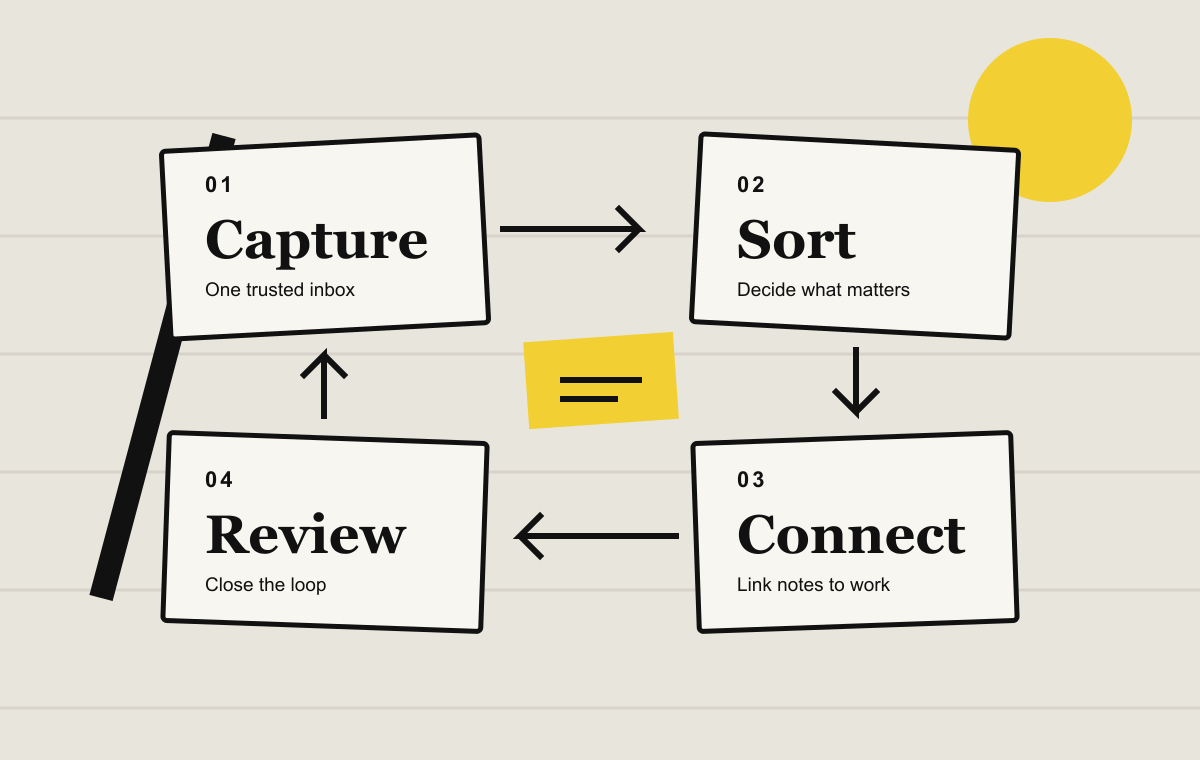
Four-stage note-taking loop: capture, sort, connect and review
A useful notebook is a loop, not a warehouse. Capture first, then decide what deserves structure.

QUICK ANSWER

Use one capture point, three marks and one regular review.

Start new notes in a single daily page or inbox. Mark actions with a box, important reference material with a star and anything that belongs elsewhere with an arrow. At the end of the day, move actions into the place where you actually manage work. Once a week, review active notebooks and archive what is finished. That small loop matters more than a perfect folder tree.

FOUR WORKFLOWS

Choose a structure for the job in front of you

WorkflowBest forSimple structureReview point
Daily logFast capture across mixed tasksOne page per day, with actions marked as boxesEnd of each day
Project bookA defined outcome with several meetings or draftsOne notebook, a contents page and dated entriesAt each project checkpoint
Meeting loopDecisions, owners and follow-upAgenda, notes, decisions, actionsBefore the next meeting
Reading to actionBooks, papers and researchSource, useful idea, your interpretation, next useWhen the source is finished

THE CORE LOOP

Capture, sort, connect, review

Capture without organizing. Open one predictable page and write. If choosing a folder takes longer than writing the thought, the system is getting in the way.

Sort after the useful part is visible. A note can be an action, a decision, a reference or something you can discard. Give structure only to notes that need to survive.

Connect the note to real work. Move an action to your task manager, link a project note to its hub page, or export a summary to the person who needs it. A handwritten page should not become a hiding place.

Review on a schedule. Daily review closes small loops. Weekly review catches unfinished work and retires notebooks that have quietly become clutter.

WORKFLOW 1

The daily log is the safest default

Give each day one page. Put the date at the top, then write notes in order instead of predicting categories. Use □ for an action, ★ for something worth keeping and → when the note has moved to another notebook or system.

At the end of the day, scan the boxes. Complete the tiny actions, schedule the real ones and cross out anything that no longer matters. Promote only durable material into a project book or reference notebook. This prevents your folder list from filling with notebooks that contain one enthusiastic page and eleven months of silence.

WORKFLOW 2

Build project books around outcomes

Name the notebook after a result, not a broad subject. “Launch autumn catalog” is easier to close than “Marketing.” Keep a short contents page at the front, date every working page and link or tag only the pages you expect to revisit.

Finish each session with three lines: what changed, what happens next and what is blocked. The next session then starts with context instead of archaeology.

WORKFLOW 3

Turn meeting notes into follow-up

Divide the page into agenda, notes, decisions and actions. Record an owner and a date beside every action. Before you leave the meeting, read the actions back and resolve vague verbs such as “explore” or “consider.”

Send a short typed summary when other people need the outcome. Keep the handwritten page as working context, not as the only copy of an agreed decision.

WORKFLOW 4

Move from reading to your own thinking

Do not copy whole pages. Record the source and page number, then separate the author’s idea from your response. A useful reading note answers four questions: What is the claim? Why does it matter? Do I agree? Where will I use it?

When you finish the source, write a short summary from memory before checking your highlights. That forces you to identify the ideas that survived, rather than mistaking a large pile of annotations for understanding.

If fixed-layout documents are hard to read, prepare them before building a study workflow. Our guide to converting PDFs for E-Ink covers cropping, reflow and transfer choices.

DEVICE TOOLS

Use the lightest feature that solves the problem

Supernote

Headings create an in-notebook table of contents. Keywords help retrieve a topic, stars flag pages and links connect notes. That is enough to build project hubs without tagging every sentence.

Supernote headings, keywords and stars ↗

reMarkable

Tags can group pages, files and folders. Handwriting conversion can create a typed page while preserving the original when you use the document conversion route. Use conversion for sharing, not as a compulsory extra step for every note.

reMarkable tag guide ↗

BOOX

The Notes app supports outlines, searchable tags, links to notes and files, and handwriting recognition. Pick one retrieval method first. Combining all of them on every page creates more maintenance, not more clarity.

BOOX note organization guide ↗

Kindle Scribe

Scribe works best when reading is central and notebooks support it. Amazon’s summary and writing-refinement tools require an internet connection, have language and regional limits, and do not reliably process tables or diagrams. Treat generated summaries as a draft to check.

Amazon Scribe notebook tools ↗

SETUP IN 15 MINUTES

A system you can start today

  1. Choose the inbox.Create one daily notebook or quick-capture page and put it somewhere you can open without searching.
  2. Choose three marks.Use a box for actions, a star for reference and an arrow for moved material. Write the key on the first page.
  3. Create one active project book.Add a contents page, a clear outcome and the next review date.
  4. Set a ten-minute weekly review.Check open actions, add useful headings or tags, export anything others need and archive finished work.
  5. Test recovery.Confirm how your device syncs or backs up, then export one notebook and open it somewhere else. A workflow is only dependable if your notes can leave the tablet.

COMMON FAILURE MODES

Keep the system smaller than the work

Too many notebooks

Create a notebook when a body of work will continue, not whenever a topic appears once.

Tags without a question

A tag is useful only if you can name the future search it will answer.

Actions trapped in handwriting

Move commitments to the system that reminds you at the right time.

No closing ritual

Archive finished projects and write a final summary. Otherwise every old notebook still looks active.

THE VERDICT

A useful note changes what happens next.

Begin with the daily log and a short review. Add project books when work becomes durable, meeting structure when other people depend on the outcome and reading notes when ideas need to travel into your own work. Features such as tags, links and handwriting conversion should shorten that loop, not become the hobby that replaces it.

If you are still choosing hardware, our E-Ink note-taking buyer guide compares devices by the jobs they do best.

Primary sources

Supernote: using headings, keywords and stars ↗Supernote: editing headings and links ↗reMarkable: tags ↗reMarkable: convert handwriting to text ↗BOOX: organizing digital notes ↗BOOX: searchable handwritten notes ↗Amazon: summarize or refine Kindle Scribe notebooks ↗